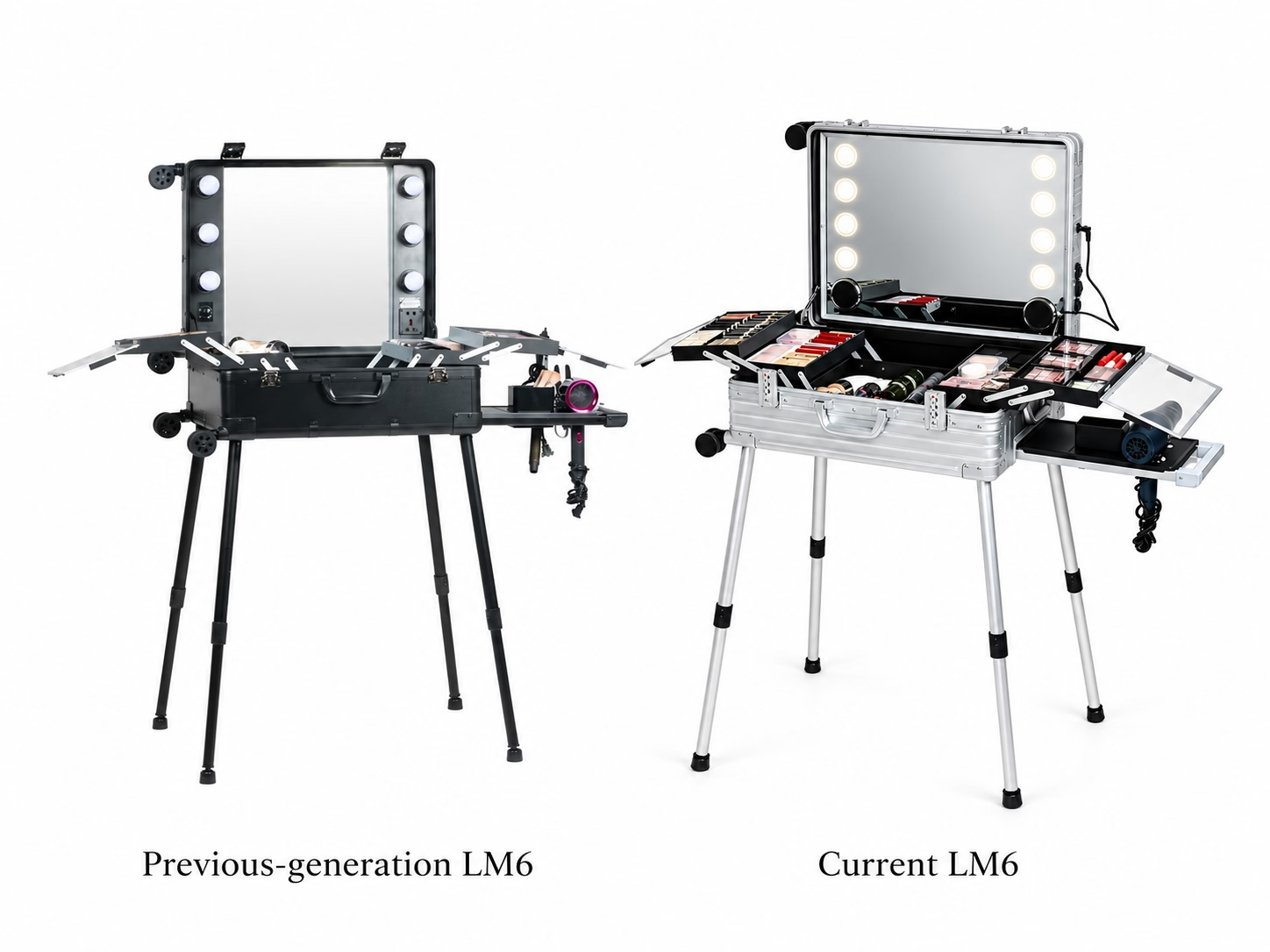
Previous-generation LM6 and current LM6 are two real generations within the same product family. Both use the LM6 name, and both have 22-inch and 24-inch versions. For a buyer returning to place another order, the model name and nominal size alone may therefore be insufficient.
The practical starting point is to match body dimensions, product photographs and configuration details. This guide explains the verified differences and the information needed to identify an existing unit or prepare an accurate repeat-order request.
Why Two LM6 Products Can Look Similar but Represent Different Generations
A previous purchase record may simply say “LM6, 24-inch.” That description identifies the family and nominal size, but it does not establish the generation or complete configuration.
The previous-generation LM6 and current LM6 have different verified dimensions, lighting information and workstation arrangements. Use those details together when checking a historical order. A familiar overall appearance is a starting reference, rather than confirmation that every configuration detail matches.
Start With the Body Dimensions
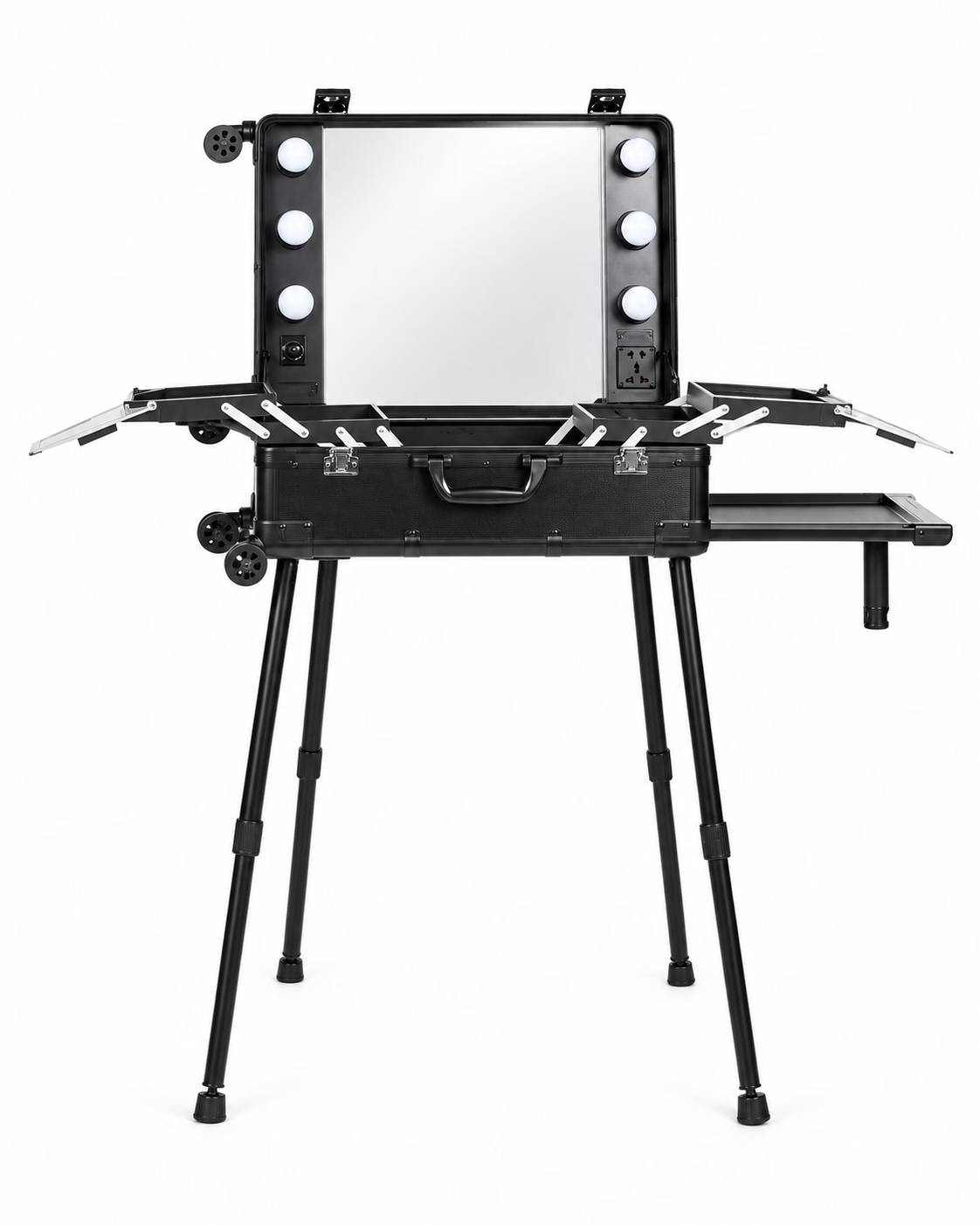
Check actual body dimensions before relying on the 22-inch or 24-inch label. The comparison below lists dimensions in L × W × H, in millimetres.
The two 22-inch versions share the same listed length and width, but their heights differ. The 24-inch versions differ in both listed length and height. These differences matter when identifying which product an earlier purchase referred to.
For a repeat order, provide the dimensions recorded on the original specification sheet or measured from the existing case, together with photographs and configuration details.
Compare the Verified Configuration Differences
| Configuration | Previous-generation LM6 | Current LM6 |
|---|---|---|
| Construction | Composite panels | Product page lists aluminum-magnesium alloy construction |
| 22-inch body dimensions, L × W × H | 400 × 220 × 520 mm | 400 × 220 × 585 mm |
| 24-inch body dimensions, L × W × H | 450 × 220 × 580 mm | 445 × 220 × 655 mm |
| Standard colors | Black / Pink | Silver / Black / Red |
| Lighting configuration | Six bulb positions around the mirror; manual brightness adjustment knob | LED lighting; 3200K / 4500K / 6500K; adjustable brightness |
| Power information | Plug-in AC input lighting system | Built-in rechargeable battery; confirm the required power arrangement for the intended use |
| Workstation support | Extendable support legs | Four removable support legs, stored inside the case; two height positions |
| Storage / work surfaces | Central storage compartment; two fold-out side trays | Fold-out trays; removable inner storage box; external side rack |
| Lock type | Combination lock | TSA combination lock |
| Standard MOQ | 150 units | 200 units |
The comparison includes only verified configuration information. If a feature is not listed for one generation, that does not automatically mean every version of that generation lacked the feature.
Lighting and Power Need Separate Confirmation
Previous-generation records describe six bulb positions around the mirror, a manual brightness adjustment knob and a plug-in AC input lighting system. Current LM6 records list LED lighting with three color-temperature settings, adjustable brightness and a built-in rechargeable battery.
Those records should not be reduced to a simple “plug-in versus cordless” comparison. A listed battery does not, by itself, establish which functions it powers or whether external power is required for the intended setup.
Before ordering, confirm the required powered functions and power arrangement for the selected configuration and destination market. For broader questions about mirror, power and workstation selection, see the LED Makeup Case Configuration Guide.
Workstation and Storage Configuration Changed
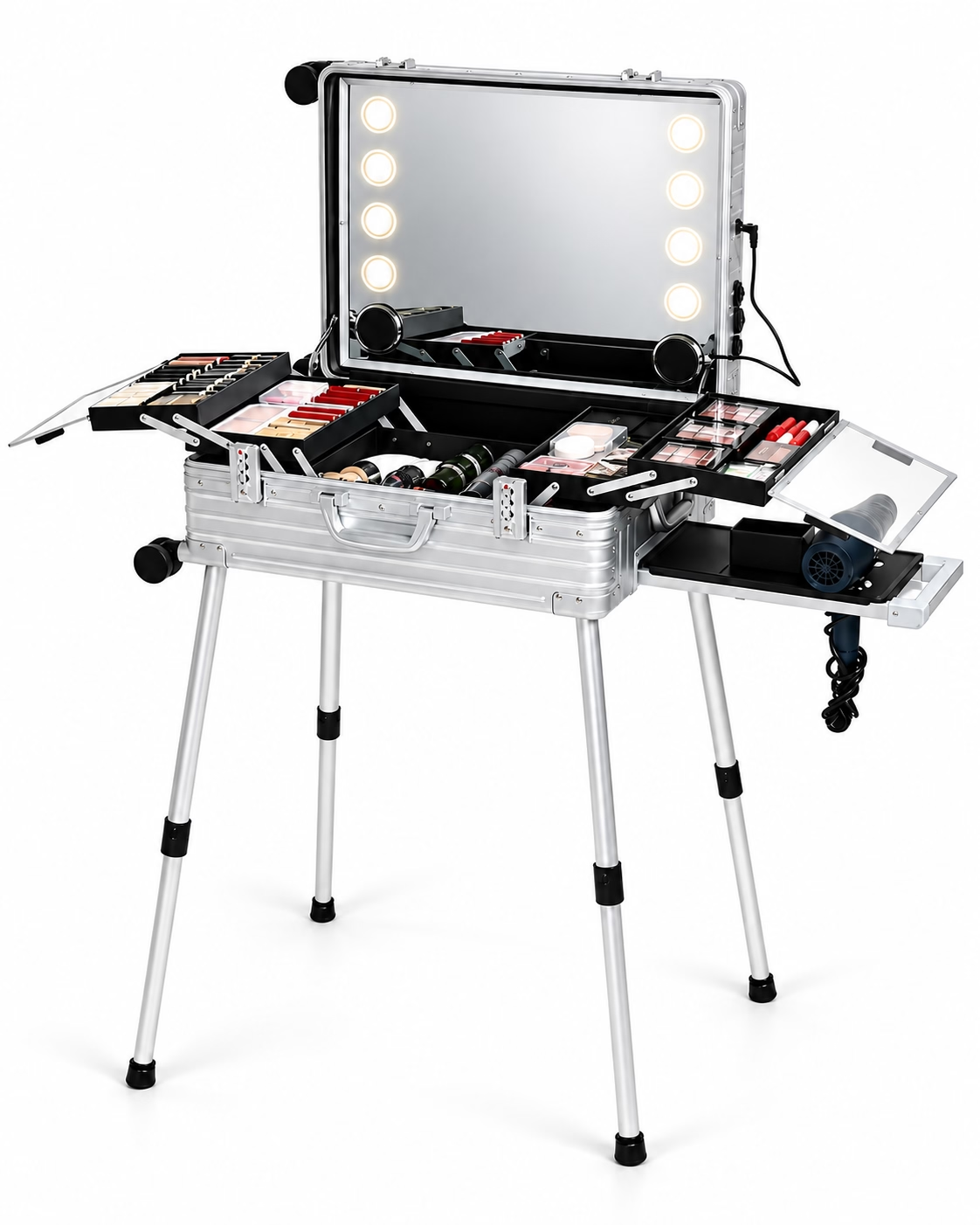
The previous-generation configuration includes extendable support legs, a central storage compartment and two fold-out side trays.
Current LM6 includes four removable support legs that are stored inside the case, with two height positions. Its storage and work surfaces include fold-out trays, a removable inner storage box and an external side rack.
For repeat orders, identify which of these arrangements needs to match the existing unit. Photographs showing the case open and the support structure in use can help communicate the requested configuration. These are structural differences; they do not establish comparative load capacity, stability or durability.
How to Reorder a Previous-Generation LM6
“Please reorder the same LM6” may not give the sales team enough information to identify the intended generation and configuration. A repeat-order request should connect the historical purchase to specific, visible details.
Provide:
- Previous order number, if available, and the previous product-page link, if known.
- Nominal version: 22-inch or 24-inch.
- Actual body dimensions, with units and dimension order.
- Clear product photographs: closed case, open interior and workstation arrangement.
- Lighting configuration: mirror lighting layout and brightness control.
- Power configuration: the arrangement supplied with the previous order.
- Support-leg arrangement: photographs and any configuration information from the order.
- Storage and tray configuration: the interior layout and surfaces that need to match.
If a detail is unavailable, identify what you can document rather than selecting a specification from another LM6 listing. Ask sales to confirm which generation and configuration the information matches, current availability and applicable order requirements before finalizing the order.
What New Buyers Should Confirm for the Current LM6
For a first order, establish the requested configuration clearly:
- Select the 22-inch or 24-inch version and confirm its actual body dimensions.
- Confirm lighting requirements and the required power arrangement.
- Review the support-leg setup, two height positions and storage configuration.
- Select a standard color: Silver, Black or Red.
- Confirm the standard MOQ of 200 units and discuss any project-specific customization requirements separately.
Keep these details together in the enquiry so that the quotation refers to a defined configuration. Do not rely solely on the LM6 name or an image when communicating the order.
Need Help Identifying Your LM6?
Contact our team with your old order information, product photos, nominal size, body dimensions and configuration details. Sales can confirm which generation and configuration the information matches, check current availability and order requirements, and prepare a quotation.